Table of Contents
Overview
Media campaigns, or "campaigns" for short, define the essential information of an advertising initiative:
- The name of the campaign
- Who the campaign is for and what they are advertising
- When the campaign will run
- How the campaign will run
- The budget of the campaign
Access the Media Campaigns Page
Access the Media Campaigns page from the top navigation bar by selecting Campaign Management > Digital Campaigns, or from the Strata Home Page under the Campaign Management section.
Media Campaigns Page UI Elements
The Media Campaigns page is a list of an Agency's campaigns.
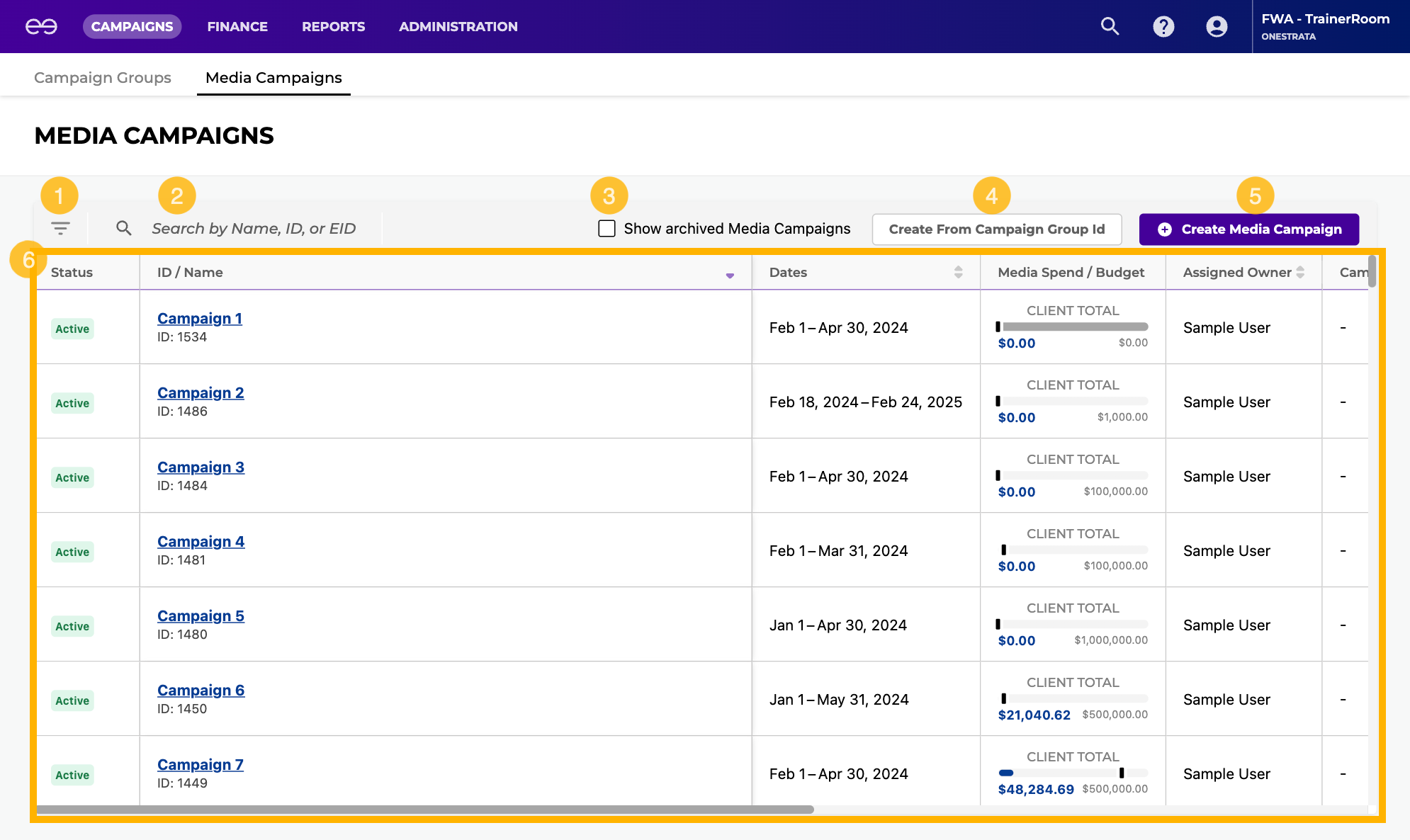
The Media Campaigns page contains the following elements:
Item | Description | |
|---|---|---|
| 1 | Filters icon | Click to open the filter pane and filter through the list of all campaigns. |
| 2 | Search bar | Search for a campaign by:
|
| 3 | Show archived Media Campaigns checkbox | Select to display campaigns that have been archived on the Media Campaigns Grid. |
| 4 | Create From Campaign Group Id button | |
| 5 | Create Media Campaign button | Click to create a new campaign. |
| 6 | Media Campaigns grid | A list of an agency's campaigns. For more information, see Media Campaigns Grid Reference. |
Media Campaigns Grid Reference
Column Name | Description |
|---|---|
Status (Campaign Status) | By default, only campaigns with an Active status are displayed on the Media Campaigns grid, The status of the campaign:
|
| ID / Name | Name (Campaign Name): The name of the campaign. ID (Campaign ID): The unique, OneStrata identification number of the campaign. EID (Campaign External ID): The external identification number of the campaign, if any. |
| Dates | The flight dates of the campaign. |
| Media Spend / Budget | A summary of committed spend, planned spend, and the campaign budget:
|
| Assigned Owner | The OneStrata user assigned to the campaign. |
| Campaign Group | The Campaign Group of the campaign, if any. |
Client Hierarchy | The name and code of the Client Group (if any) and Client associated with the campaign. |
Product Hierarchy | The name and code of the Product Group (if any) and Product associated with the campaign. |
| Media | The Media Type of the campaign. |
| Agency / Business Unit | The Agency and Business Unit associated with the campaign. |
| Creation Date | The date that the campaign was created within OneStrata. |