Table of Contents
Overview
The Advertiser View page provides a read-only, customizable view of a schedule that can be downloaded and shared with clients or retained for internal documentation purposes.
Access the Advertiser View Page of a Schedule
To access the Advertiser View page of a particular schedule, do the following:
- Navigate to the Schedule tab of the desired campaign.
- Optional: If the campaign does multiple schedule options, use the Schedule Option list to change which schedule option is displayed in the Schedule grid.
- Click the Advertiser View button.
Advertiser View Page UI Elements
The Advertiser View page summarizes essential campaign information to facilitate review and approvals with the client.
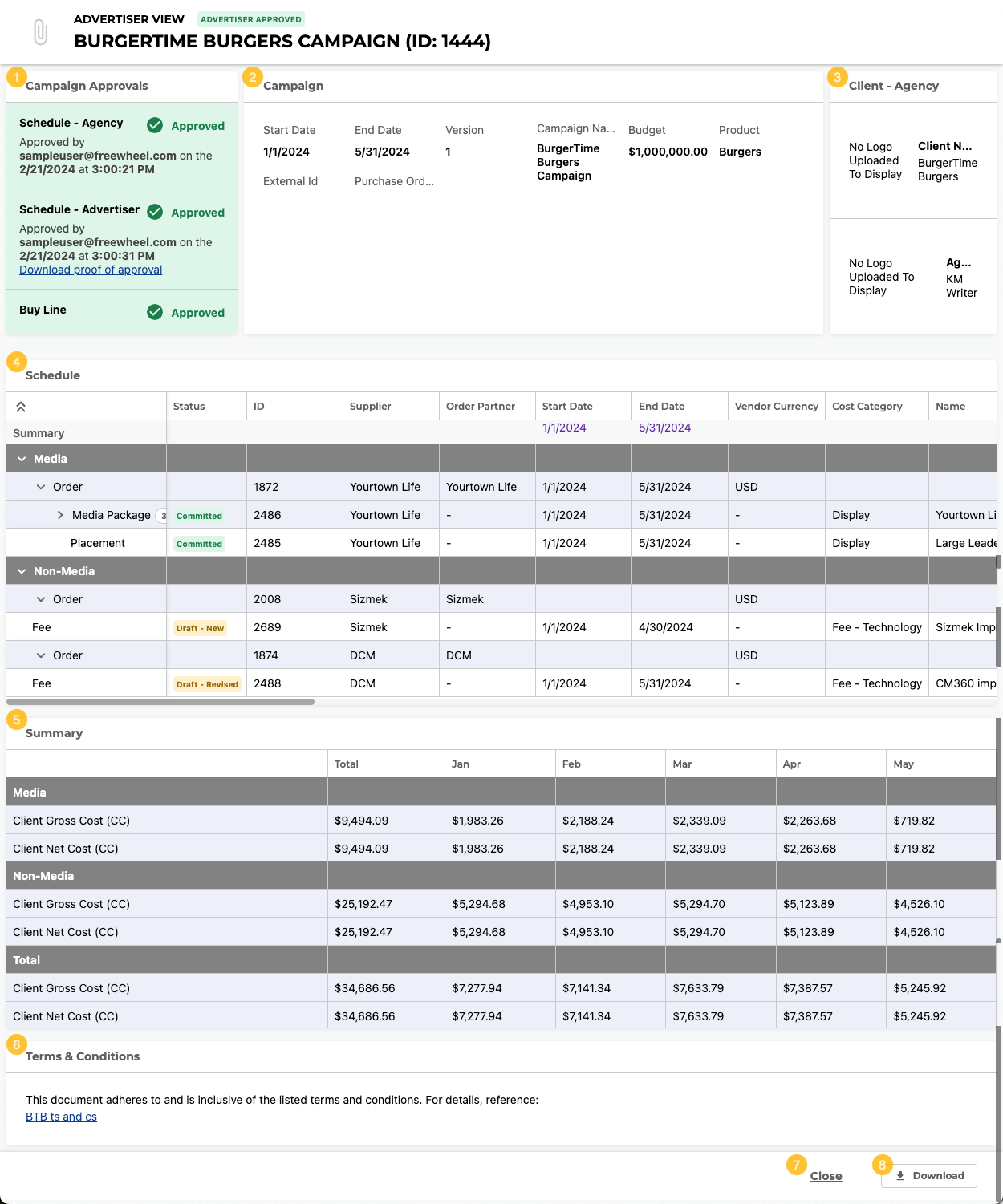
The Advertiser View page contains the following elements:
Item | Description | |
|---|---|---|
| 1 | Campaign Approvals section | Any required Advertiser Approvals and Agency Approvals. Use this widget to action these approvals and download approval documentation. Approval requirements are enabled via Application Settings in Administration. |
| 2 | Campaign Details section | Information about the campaign. |
| 3 | Client - Agency section | Information about the client and agency of the campaign, including contact information and logos. |
| 4 | Schedule section | Information about the media and non-media purchases in the campaign, grouped by Order Partner. |
| 5 | Billing Summary section | The costs of the media and non-media purchases of the campaign, summed in total and by month. |
| 6 | Terms & Conditions section | The set of Terms & Conditions associated with the campaign. Click the link to download a PDF copy of the Terms & Conditions. |
| 7 | Close button | Click to exit the Advertiser View page and return to the Schedule tab. |
| 8 | Download button | Click to download the Advertiser View page as an Excel sheet. |
Advertiser View - Campaign Details Reference
The columns and column order in this section are defined by the Advertiser View template. For more information, see Advertiser View Template and System Default Advertiser View Template.
The Advertiser View - Campaign Details section displays general information about the campaign.
The following table describes the default columns and column order of the Advertiser View - Campaign Details section:
| Column Name | Description | |
|---|---|---|
| 1 | Start Date | The start date of the campaign. |
| 2 | End Date | The end date of the campaign. |
| 3 | Campaign Name | The name of the campaign. |
| 4 | Budget | The budget of the campaign. |
| 5 | Product | The product of the campaign. |
The following table describes the other columns that can be added to the Campaign Details section:
| Column Name | Description |
|---|---|
| Version | Not currently available. |
| External ID | The external identifier of the campaign. |
| Purchase Order Number(s) | The identifier of the purchase order(s) associated with the campaign, if any. |
| Market(s) | Not currently available. |
Advertiser View - Schedule Reference
The columns and column order in this section are defined by the Advertiser View template. For more information, see Advertiser View Template and System Default Advertiser View Template.
The Advertiser View - Schedule section displays information about the media and non-media purchases in the campaign, grouped by Order Partner. The values in this section are copied from the Schedule grid columns with the same name.
The following table describes the default columns and column order of the Advertiser View - Schedule section:
Input Type | Column Name | Description | |
|---|---|---|---|
| 1 | Copied | Start Date | The start date of the Schedule grid line. |
| 2 | Copied | End Date | The end date of the Schedule grid line. |
| 3 | Copied | Supplier | The Supplier entity assigned to the Schedule grid line. |
| 4 | Copied | Name | The name of the Schedule grid line. |
| 5 | Copied | Format | The format type of the Schedule grid line. |
| 6 | Copied | Format Dimension | The dimensions of the Schedule grid line.
|
| 7 | Copied | Cost Category | The Cost Category assigned to the Schedule grid line. |
| 8 | Copied | Rate Type | The rate type of the Schedule grid line. |
| 9 | Copied | Client Net Rate (CC) | The cost per unit to the client after any discounts are added but before any commissions or taxes are added. |
| 10 | Copied | Units | The number of units being purchased. |
| 11 | Copied | Client Net Cost (CC) | The cost to the client after any discounts are added but before any commissions or taxes are added. |
| 12 | Copied | Unit Calendar | A high-level summary and visual representation of a Schedule grid line's billing periods. For more information, see Unit Calendar Bars. |
| 13 | Copied | Client Commission Rule | The Commission record applied to the Schedule grid line, if any. Depending on Commission record settings, campaign settings, and Schedule grid line values, a default Commission record may be automatically applied. |
| 14 | Copied | Client Commission Cost (CC) | The agency commission charged to the client. |
| 15 | Copied | Client Total Cost (CC) | The cost to the client after any discounts and commissions are added but before any taxes are added. |
Advertiser View - Billing Summary Reference
The columns and column order in this section are defined by the Advertiser View template. For more information, see Advertiser View Template and System Default Advertiser View Template.
The Advertiser View - Billing Summary section displays the costs of the media and non-media purchases of the campaign, summed in total and by month.
The following table describes the default rows and row order of the Advertiser View - Billing Summary section:
| Column Name | Description | |
|---|---|---|
| 1 | Client Gross Cost (CC) | The cost to the client before any discounts, commissions, or taxes are added. |
| 2 | Client Net Cost (CC) | The cost to the client after any discounts are added but before any commissions or taxes are added. |
| 3 | Client Total Cost (CC) | The cost to the client after any discounts and commissions are added but before any taxes are added. |
The following table describes the other rows that can be added to the Billing Summary section:
| Column Name | Description |
|---|---|
| Client Discount Cost (CC) | The discount given by the agency to the client. |
| Client Commission Cost (CC) | The agency commission charged to the client. |
| Client Tax Cost (CC) | The tax on activity charged to the client. |
| Client Tax on Commission Cost (CC) | The tax on commission charged to the client. |
| Client Total With Tax Cost (CC) | The total cost to the client after any discounts, commissions, and taxes are added. |