Table of Contents
Overview
The Actualization tab provides a way to easily compare a media schedule plan to actual campaign delivery metrics. Users can pull in delivery metrics from external integrations with a single click, validate the metrics, and then send the actualized and approved payment amounts to the Agency's financial system.
Access the Actualization Tab of a Campaign
To go to the Actualization tab of a campaign, do the following:
- Go to the Media Campaigns page (Campaign Management > Campaigns).
- In the Media Campaigns grid, click on the name of the campaign to open it.
- By default, the campaign opens on its Overview tab.
- Click on Actualization to open the Actualization tab.
Actualization Tab UI Elements
The Actualization tab displays information related to actualizing committed Cost Lines.
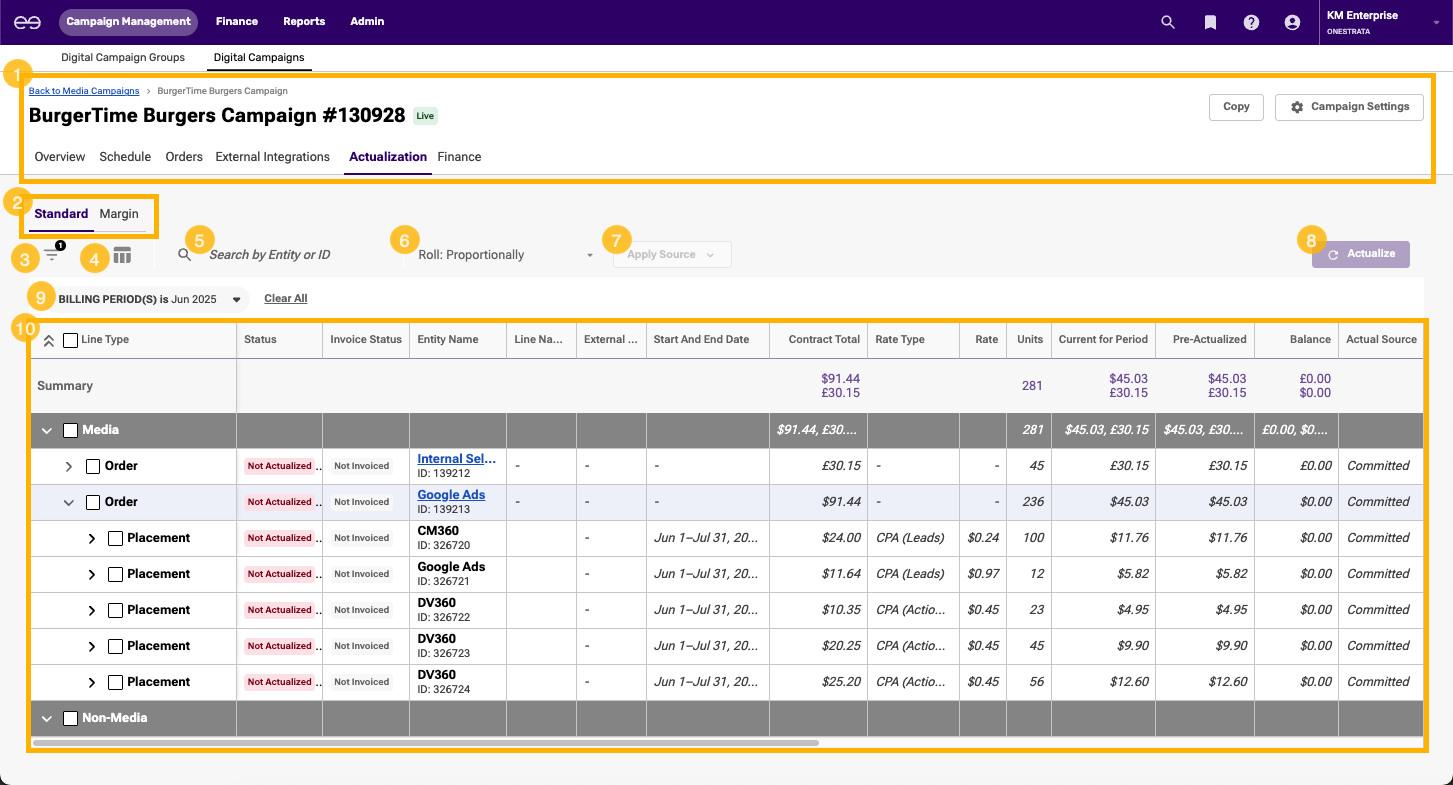
The Actualization tab contains the following elements:
| Item | Description | |
|---|---|---|
| 1 | Campaign Header | The campaign header contains the name and ID of a campaign, information about campaign status, and access to campaign management tabs and settings. For more information, see Campaign Header Reference. |
| 2 | Standard and Margin selection | Click to switch between the Standard Actualization grid and the Margin Actualization grid. |
| 3 | Filters icon | Click the Filters icon to open the filter pane and filter through the list of all committed Cost Lines within the campaign. |
| 4 | Column icon | Click the Columns icon to open the Actualization grid column picker and customize the columns displayed within the Actualization grid. |
| 5 | Search bar | Search for a Cost Line by Entity (Supplier or Order Partner) or ID. |
| 6 | Roll settings | Click the Roll settings to select how any under- or over-delivery balance is carried over to future months:
For more information, see Types of Delivery Balance Roll. |
| 7 | Apply Source button
| Click the Apply Source button to update the actual value columns:
Actual value source options:
For more information, see Types of Actual Value Sources. |
| 8 | Actualize button | If no Actualization grid lines are selected, the Actualize button is inactive. If one or more Actualization grid lines are selected, the Actualize button is active. Click the Actualize button to actualize the selected lines. |
| 9 | Billing Period(s) filter | Click the Billing Period(s) filter to select the billing periods that are displayed in the Actualization grid. By default, only one billing period (month) is selected and displayed on the Actualization grid.
|
| 10 | Actualization grid | A list of a campaign's committed Cost Lines, grouped by order and broken down into the displayed billing period(s). By default, only one billing period (month) is selected:
For more information, see Actualization Grid Reference. |
Actualization Grid Reference
There are two types of Actualization grids:
- Standard Actualization grid: Used to actualize standard Cost Lines
- Margin Actualization grid: Used to actualize margin Cost Lines
The following table describes the default columns and column order of the Actualization grids:
| Actualization Grid Type | Column Name | Description |
|---|---|---|
Standard, Margin | Read-only Line Type | The level of the Actualization grid line:
|
Standard, Margin | Read-only Status | The actualization status of the Actualization grid line. For orders, the possible statuses are:
For Cost Lines, the possible statuses are:
For billing periods, the possible statuses are:
|
Standard, Margin | Read-only Invoice Status | The invoice status of the Actualization grid line. For orders, the possible statuses are:
For Cost Lines, the possible statuses are:
For billing periods, the possible statuses are:
|
Standard, Margin | Read-only Entity Name | The name and identifier of the entity or entities associated with the Actualization grid line. For orders, the values are:
For Cost Lines, the values are:
For billing periods, the values are:
|
Standard, Margin | Read-only Line Name | The name of the Actualization grid line, if any. |
Standard, Margin | Read-only External ID This value is only available for billing periods. | The identifier of the billing period in an external, non-OneStrata system. This value is only available if the Billing Period line has been exported to an external financial system. |
Standard, Margin | Read-only Start and End Date | The start and end dates of the Cost Line or billing period, as defined by the schedule. |
Standard, Margin | Read-only Contract Total | The committed vendor cost of the Actualization grid line:
|
Standard, Margin | Read-only Rate Type This value is only available for Cost Lines. | The rate type of the Cost Line, as defined by the schedule. |
Standard, Margin | Read-only Rate | The committed vendor rate of the Cost Line or billing period:
|
Margin | Read-only Client Net Rate (VC) | The committed Client Net Rate (VC) of the margin Cost Line or billing period. |
Standard, Margin | Read-only Units | The number of units committed for the Actualization grid line. |
Standard, Margin | Read-only Current For Period | The current committed vendor cost of the Actualization grid line, for the displayed billing period(s).
At the billing period level, Current For Period is the same as Contract Total. |
Standard, Margin | Read-only Pre-Actualized | The pre-actualization vendor cost of the Actualization grid line, for the displayed billing period(s).
If the line has never been actualized, the Pre-Actualized value is equal to its Current for Period value. Once the line is actualized, the Pre-Actualized value becomes locked and no longer changes, even if the Current for Period value changes. For example, imagine a Cost Line that has never been actualized:
Then, the Cost line is actualized:
|
Standard, Margin
| Read-only Balance | The cost balance (the difference between the actualized and committed values) of the Actualization grid line, for the displayed billing period(s). This value is calculated according to the following formula: Balance = Actual Cost for Period - Current for Period |
Standard, Margin
| Read-only Actual Source | The actual value source(s) of the Actualization grid line:
For more information, see Types of Actual Value Sources. |
Standard | Actual Cost For Period This value is part of a triangulation set. For more information, see Standard Actualization Triangulation. | The actual vendor cost of the Actualization grid line, for the displayed billing periods(s). When a billing period is actualized, this value is sent to the external finance system.
If the Actual Source value is Site, 3rd Party, or Media, the value of Actual Rate is calculated according to the following formula: Actual Rate = Actual Cost / Actual Units |
Standard | Actual Rate This value is part of a triangulation set. For more information, see Standard Actualization Triangulation. | The actual vendor rate of the Cost Line or billing period: When a billing period is actualized, this value is sent to the external finance system.
|
Standard, Margin | Actual Units This value is part of a triangulation set. For more information, see Standard Actualization Triangulation. | The number of actual units for the Cost Line or billing period, for the displayed billing periods(s). When a billing period is actualized, this value is sent to the external finance system. |
Margin | Vendor Net Cost (VC) This value is part of a triangulation set. For more information, see Margin Percentage Triangulation or Margin Actual Units Triangulation. | The Vendor Net Cost (VC) of the Actualization grid line, for the displayed billing period(s). |
Margin | Margin % This value is part of a triangulation set. For more information, see Margin Percentage Triangulation. | The margin percentage of the Cost Line or billing period, for the displayed billing period(s). At the Cost Line level, Margin % is calculated by averaging the margin percentage of all billing periods currently displayed under the Cost Line. |
Margin | Client Net Cost (VC) This value is part of a triangulation set. For more information, see Margin Percentage Triangulation or Margin Actual Units Triangulation. | The Client Net Cost (VC) of the Cost Line or billing period, for the displayed billing periods(s). |
Standard | Calculated Fee Cost This value only applies to Assigned fees. For more information, see Media (Source). | The system-calculated vendor cost (Vendor Net Cost or Vendor Gross Cost, depending on the cost type of the campaign) of the Assigned fee, for the displayed billing period(s). |
Margin | Fee Calculated Vendor Cost This value only applies to Assigned fees. For more information, see Media (Source). | The system-calculated Vendor Net Cost (VC) of the Assigned fee, for the displayed billing period(s). |
Margin | Fee Calculated Client Cost This value only applies to Assigned fees. For more information, see Media (Source). | The system-calculated Client Net Cost (VC) of the Assigned fee, for the displayed billing period(s). |
Standard | Fee Calculated Units This value only applies to Assigned fees. For more information, see Media (Source). | The system-calculated number of units of the Assigned fee, for the displayed billing period(s). |
Standard, Margin
| Site Cost This value only applies to Cost Lines linked to an external entity in a DSP, Search, or Social provider. | Retrieved from the Site source: The vendor delivery cost of the Actualization grid line, for the displayed billing period(s):
|
Standard, Margin
| Site Units This value only applies to Cost Lines linked to an external entity in a DSP, Search, or Social provider. | Retrieved from the Site source: The number of units delivered for the Actualization grid line, for the displayed billing periods(s), |
Standard, Margin
| 3rd Party Cost This value only applies to Cost Lines linked to an external placement in an Ad Server provider. | The system-calculated vendor delivery cost of the Actualization grid line, for the displayed billing period(s):
|
Standard, Margin
| 3rd Party Units This value only applies to Cost Lines linked to an external placement in an Ad Server provider. | Retrieved from the 3rd Party source: The number of units delivered for the Actualization grid line, for the displayed billing periods(s), |
Standard, Margin | Verified Units The value only applies to Cost Lines that:
| Retrieved from the Verified source: The number of verified units delivered for the Actualization grid line, for the displayed billing period(s), For IAS, this value is equivalent to the IAS Viewable Impressions metric. |
Standard, Margin | Variance The value only applies to Cost Lines that:
| The difference between the verified delivered units and delivered units for the Actualization grid line, for the displayed billing period(s). This value is calculated according to the following formula: Variance = 3rd Party Units - Verified Units |
Margin
| Other Income (VC) | The margin amount (the difference between the Client Net Cost (VC) and Vendor Net Cost (VC) values) of the Actualization grid line, for the displayed billing period(s). This value is calculated according to the following formula: Other Income (VC) = Client Net Cost (VC) - Vendor Net Cost (VC) |
Standard, Margin | Invoiced Amount | The sum of all invoiced amounts that have been matched or cleared against the Actualization grid line, for the displayed billing period(s). |
Standard, Margin | Cleared Invoiced Amount | The sum of all invoiced amounts that have been cleared against the Actualization grid line, for the displayed billing period(s). |