Table of Contents
Overview
The Supply Transparency dashboard reports on purchased inventory to provide insights into authenticity and performance of different inventory sources. The dashboard displays App-ads.txt, Ads.txt, and Sellers.json compliance, and shows how transparency signals are related to performance across different sellers.
Accessing the Supply Transparency Dashboard
The Supply Transparency Dashboard can be accessed by hovering over the Analytics module button positioned in the top left corner of the UI navigation.
Supply Transparency Dashboard UI
Filters and Page Actions

| # | Item | Description |
|---|---|---|
1 | Filters | Options for filtering the dashboard. Filter text fields are case sensitive; if no results are returning for a filter, double check the capitalization matches the name exactly. |
2 | Page Actions | Additional page actions. From left to right:
|
App-Ads.txt and Ads.txt
The first two sections in the Supply Transparency Dashboard display impressions, spend, and exchange or domain compliance with Ad.txt or App-ads.txt. The App-ads.txt and Ads.txt sections both feature the same charts, shown and described in the below image and table.
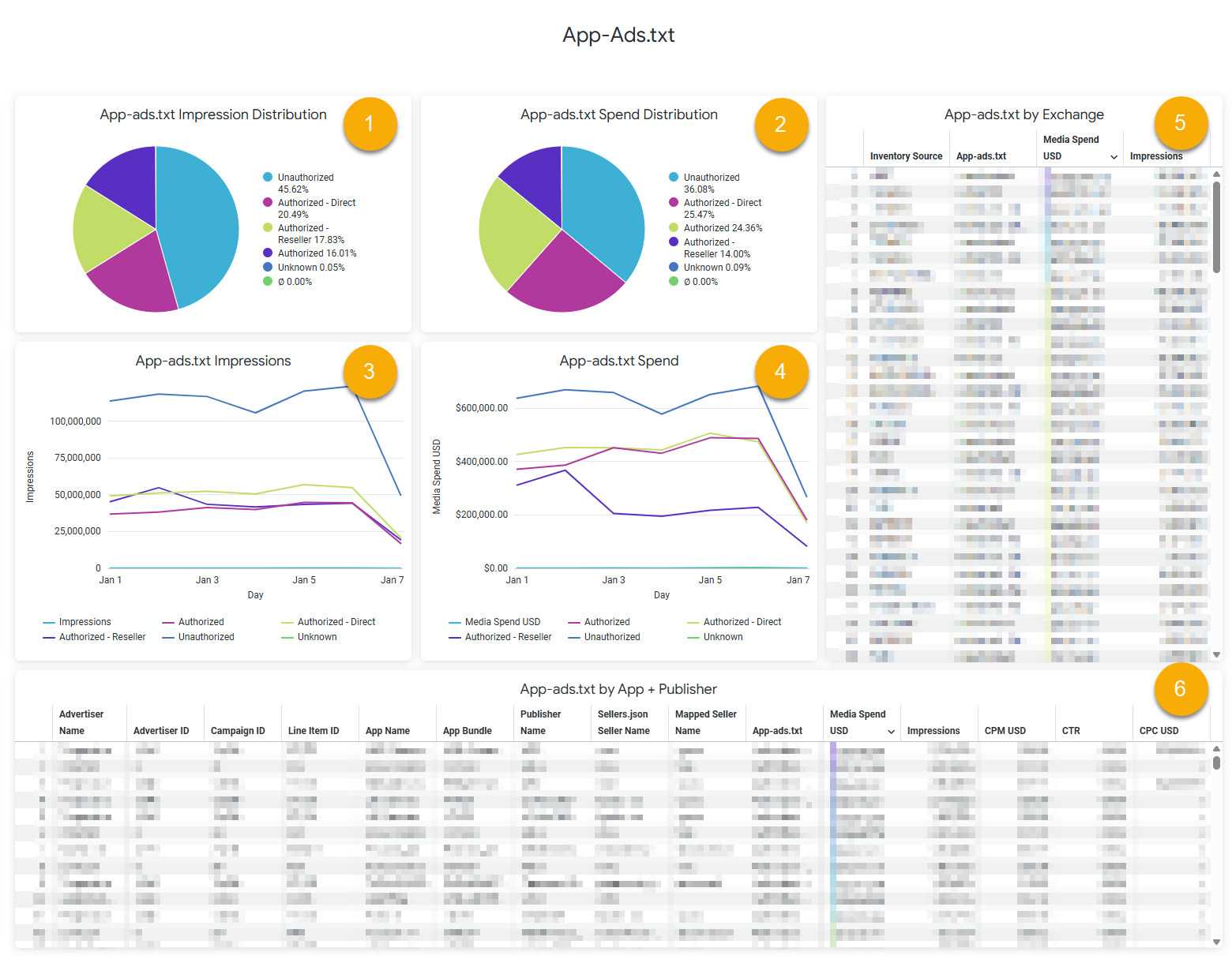
| # | Item | Description |
|---|---|---|
1 | App-ads.txt/Ads.txt Impression Distribution Chart | A pie chart that displays how impressions are distributed based on the following App-ads.txt or Ads.txt statuses. Possible fields include:
Hover over a section of the pie chart to view the exact number of impressions from each status. |
2 | App-ads.txt/Ads.txt Spend Distribution Chart | A pie chart that displays how spend is distributed based on the following App-ads.txt or Ads.txt statuses. Possible fields include:
Hover over a section of the pie chart to view the exact media spend for each status. |
3 | App-ads.txt/Ads.txt Impressions Chart | A line chart that displays the number of impressions by each App-ads.txt or Ads.txt status over the data range selected in the page filter. Hover over a section in the graph to view the date and exact number of impressions for any point on the chart. |
4 | App-ads.txt/Ads.txt Spend Chart | A line chart that displays the spend for each App-ads.txt or Ads.txt status over the data range selected in the page filter. Hover over a section in the graph to view the date and exact spend for any point on the chart. |
5 | App-ads.txt/Ads.txt by Exchange Table | A table that displays App.ads.txt or Ads.txt status by inventory source, and includes details on spend and impressions. |
6 | App-ads.txt/Ads.txt by Domain Table | A table that displays App.ads.txt or Ads.txt status by app and publisher name, and includes details on spend and impressions. |
Sellers.json
The Sellers.json section is below the App-ads.txt and Ads.txt sections at the bottom of the dashboard.
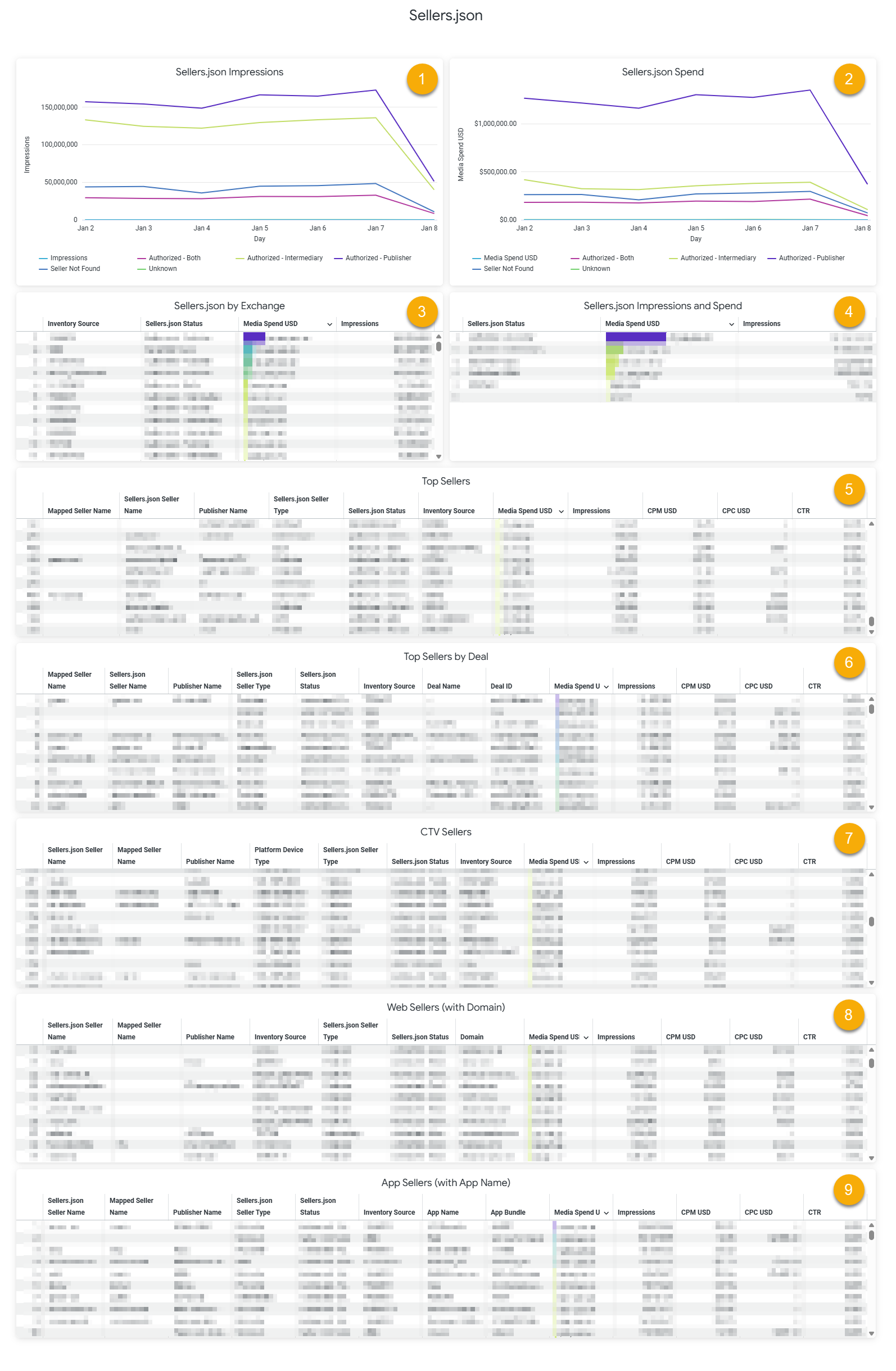
| # | Item | Description |
|---|---|---|
1 | Sellers.json Impressions Chart | A chart that displays the number of impressions distributed over the following Sellers.json statuses. Possible fields include:
Hover over a section in the graph to view the date and exact number of impressions for any point on the chart. |
2 | Sellers.json Spend Chart | A chart that displays spend distributed over the following Sellers.json statuses. Possible fields include:
Hover over a section in the graph to view the date and exact spend for any point on the chart. |
3 | Sellers.json by Exchange Chart | A table that displays inventory source by Sellers.json status, and includes details on spend and impressions. |
4 | Sellers.json Impressions and Spend Chart | A table that displays the total number of spend and impressions for each type of Sellers.json status. |
5 | Top Sellers Table | Lists sellers identified identified by Sellers.json, sorted by spend amounts. This table also includes metrics on impressions, CPM, CPC, and CTR for identifying the return on impressions from different sellers. |
6 | Top Sellers by Deal Table | Lists sellers identified identified by Sellers.json, broken out by deal This table also includes metrics on impressions, CPM, CPC, and CTR for identifying the value of high-spend deals. |
7 | CTV Sellers Table | The top CTV sellers identified by Sellers.json. This table also includes metrics on impressions, CPM, CPC, and CTR for identifying the return on impressions from different CTV sources. |
8 | Web Sellers (with Domain) Table | The highest-spend web sellers and domains identified by Sellers.json. This table also includes metrics on impressions, CPM, CPC, and CTR for identifying the return on impressions from different web supply sources. |
9 | App Sellers (with App Name) Table | The highest-spend app sellers and app names identified by Sellers.json. This table also includes metrics on impressions, CPM, CPC, and CTR for identifying the return on impressions from different web supply sources. |