|
Overview
Campaign groups allow users to link multiple campaigns across multiple Media Types into a single group with a global goal and/or budget.
Access the Campaign Groups Page
Access the Campaign Groups page from the top navigation bar by selecting Campaign Management > Digital Campaign Groups, or from the Strata Home Page under the Campaign Management section.
Campaign Group Page UI Elements
The Campaign Groups page is a list of an enterprise's campaign groups.
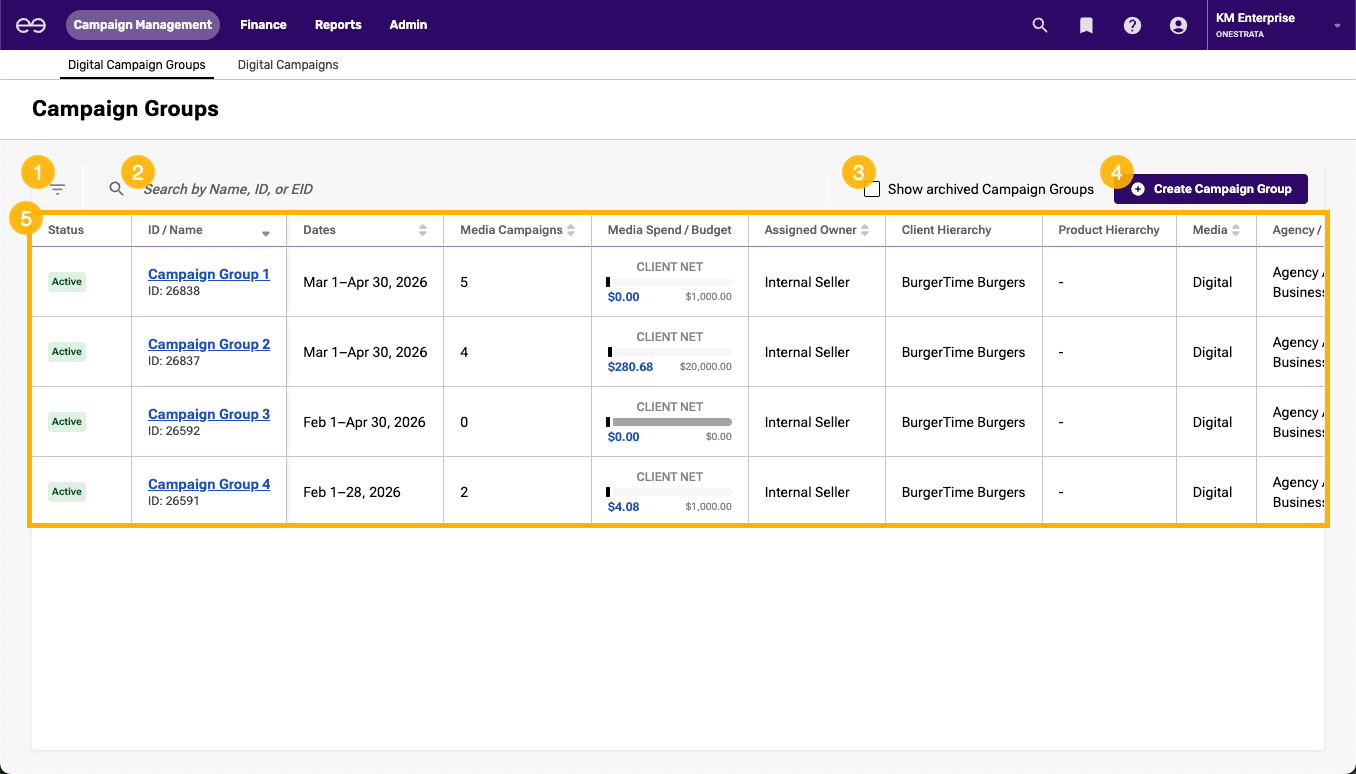
The Campaign Groups page contains the following elements:
Item | Description | |
|---|---|---|
| 1 | Filters icon | Click to open the filter pane and filter the campaign groups displayed in the Campaign Groups grid. |
| 2 | Search bar | Search for a campaign group by:
|
| 3 | Show archived Campaign Groups checkbox | Select to display archived campaign groups on the Campaign Groups grid. |
| 4 | Create Campaign Group button | Click to create a new campaign group. |
| 5 | Campaign Groups grid | A list of an enterprise's campaign groups. For more information, see Campaign Groups Grid. |
 Campaign Groups Grid
The following table contains information about columns in the Campaign Groups grid:
| Field Name | Description |
|---|---|
| Status | The status of the campaign group:
|
| ID / Name | Name (Campaign Group Name): The name of the campaign group. ID (Campaign Group ID): The OneStrata identifier of the campaign group. |
| Dates | The date range (start and end dates) of the campaign group. |
| Media Campaigns | The number of campaigns linked to the campaign group. |
| Media Spend / Budget | A summary of the campaign group budget:
|
| Assigned Owner | The OneStrata user assigned to the campaign group. |
| Client Hierarchy | The Client or Client Group of the campaign group. |
| Product Hierarchy | The Product or Product Group of the campaign group. |
| Media | The Media Types of the campaign group. |
| Agency / Business Unit | The Agency and Business Unit of the campaign group, which is determined by the Client or Client Group. |
| Creation Date | The date that the campaign group was created. |
Campaign Group Details Page UI Elements
The Campaign Group Details page contains information about a specific campaign group.
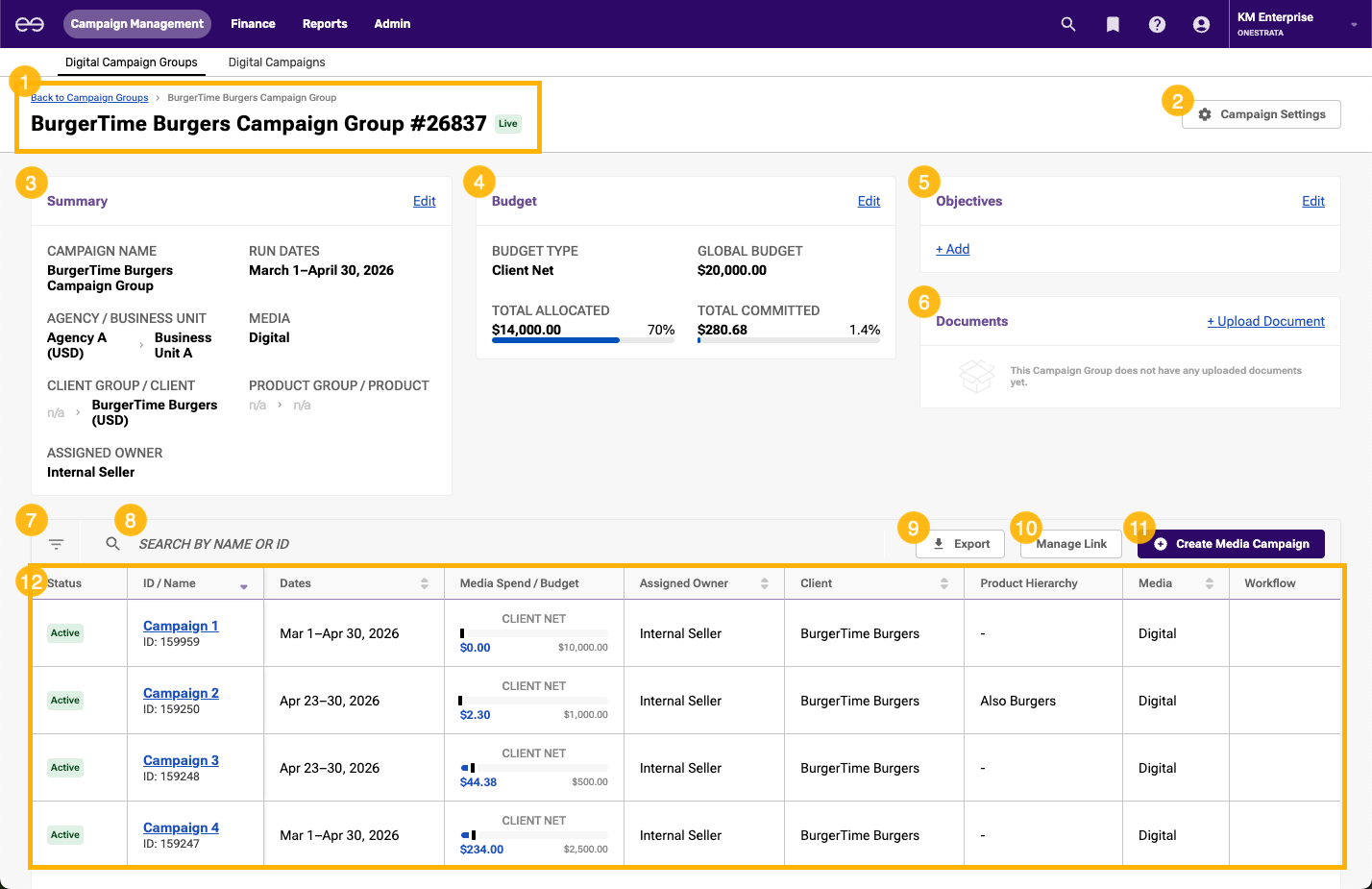
The Campaign Group Details page contains the following elements:
Item | Description | |
|---|---|---|
| 1 | Campaign group header | The campaign group header contains:
|
| 2 | Campaign Settings button | Click to edit the settings of the campaign group. |
| 3 | Summary section | Displays general details about the campaign group:
|
| 4 | Budget section | Displays budget-related information for the campaign group:
|
| 5 | Objectives section | Displays any descriptions or objectives added to the campaign group. |
| 6 | Documents section | Displays any supporting documents that have been uploaded to the campaign group. |
| 7 | Filters icon | Click to open the filter pane and filter the campaigns displayed in the Campaign Group Details grid. |
| 8 | Search bar | Search for a campaign in the campaign group by:
|
| 9 | Export button | |
| 10 | Manage Link button | Click to link existing campaigns to or unlink campaigns from the campaign group. |
| 11 | Create Media Campaign button | |
| 12 | Campaign Group Details grid | A list of campaigns in the campaign group. For more information, see Campaign Group Details Grid. |
 Campaign Group Details Grid
The following table contains information about columns in the Campaign Group Details grid:
| Field Name | Description |
|---|---|
| Status | The status of the campaign:
|
| ID / Name | Name (Campaign Name): The name of the campaign. ID (Campaign ID): The OneStrata identifier of the campaign. |
| Dates | The date range (start and end dates) of the campaign. |
| Media Spend / Budget | A summary of the campaign budget:
|
| Assigned Owner | The OneStrata user assigned to the campaign. |
| Client | The Client or Client Group of the campaign. |
| Product Hierarchy | The Product or Product Group of the campaign. |
| Media | The Media Type of the campaign. |
| Workflow | For future use. |