|
Overview
Creative add-ons are pixels or scripts that get added to existing creatives for impression tracking in association with banner or video ads. Creative add-ons can be associated with multiple creatives and can be included by default for all new creatives in an account. Common use-cases include viewability and verification for vendors, as well as impression trackers. Creative add-ons cannot be used with any native creative formats. |
Accessing Creative Add-Ons
To access the Creative Add-Ons page, navigate to Trafficking > Creative Add-Ons at the top of the screen.
Creative Add-On List View
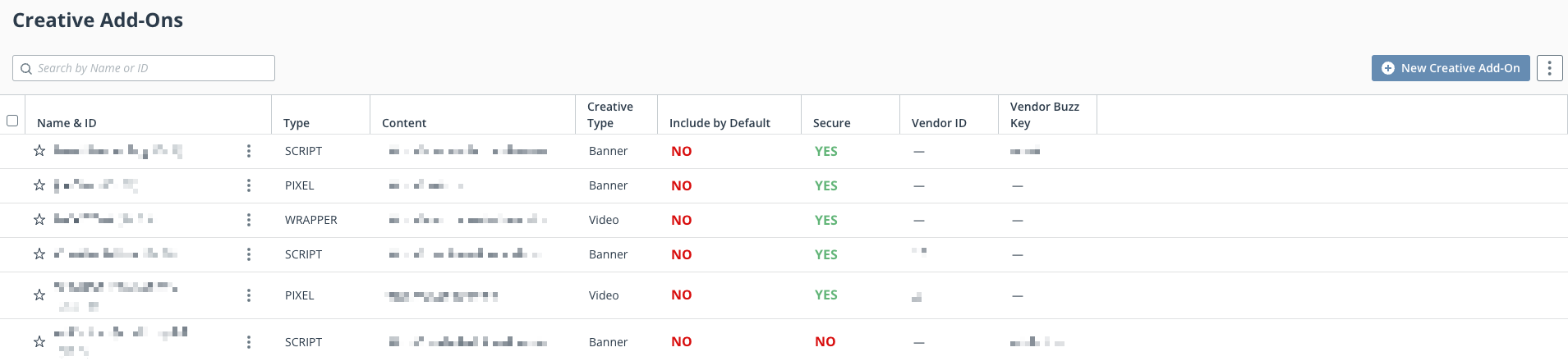
List View Fields
| Column Name | Description |
|---|---|
| Name & ID | Creative Add-On Name. |
| Type | Creative Add-On type, either Pixel or Script. |
| Content | Javascript or tracking pixel URL in the Creative Add-On URL. |
| Creative Type | Banner, Native, or Video. |
| Include by Default | Include by default for all new creatives. |
| Secure | URL; either secure or not secure. |
| Vendor ID | ID associated with vendor chosen for the creative add-on. |
| Vendor Buzz Key | Account buzz key for vendor used in creative add-on. |
Create a Creative Add-On
- Navigate to Trafficking module > Creative Add-Ons > New Creative Add-On. Additionally, creative add-on's may be created by clicking the
 button, then clicking Creative Add-On at the top right of the UI.
 A creation screen will appear with the following fields to complete:
*RequiredField Name Definition Creative Add-On Name* Enter a desired Creative Add-On name. Advertiser Select an advertiser to apply this creative add-on to. There is also an option to apply this on an account level from the dropdown menu. Selecting Account Level will apply this creative add-on to all creatives in the account. Vendor Associate the creative add-on with a vendor. Creative Type* Banner, Native, or Video creative format. Creative Add-On Type* Pixel or Script format. CPM Cost Associate a CPM cost; represented in a currency figure.
Most vendors charge a billable fee for use of their creative add-ons.
Include by Default (Toggle) Toggle on or off to include this creative add-on by default to creatives in the account. Creative Add-On URL* The URL that is associated with the pixel for tracking clicks or impressions. Secure (Toggle) Identify if the pixel is secure or not. This can be represented by (https: or http:). Alternative ID Any number or string used to map this object to an object in an outside system. Add Notes Any desired notes for this creative add-on. Status (Toggle) Either Active or Inactive. The default setting is Active. - Click Save on the lower right corner.
Associate the Creative Add-On With a Creative
Once the creative-add on has been made, it should then be applied to a creative to start operating. Follow the steps below for instructions:
- Start by navigating to Trafficking module > and select Creatives under Core Objects.
- Click on a creative name to open the Overview page, then expand the Pixels and Scripts section.
- Click Select Creative Add-Ons and include any desired add-ons to apply. Multiple can be selected at once.
- Click Save & Continue to save the changes.